Loading...
Click to enlarge

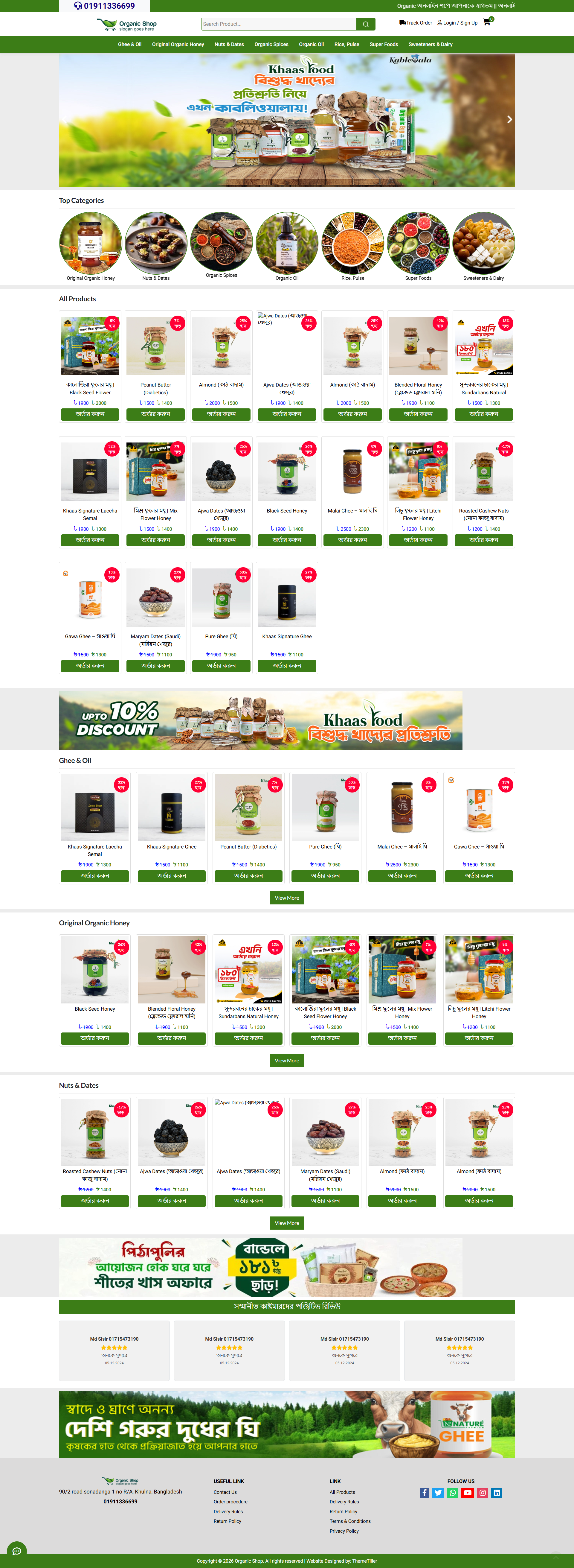
Laravel ecommerce platform tailored for the Bangladesh market with multi-category product management, cart/checkout system, local payment gateways (bKash, Shurjopay, COD), customer registration with SMS OTP verification, order tracking, and a full admin dashboard with POS, role-based access control, Pathao courier integration, and marketing tools (pixels, tag manager).

Admin features :-
📊 Dashboard
- Admin dashboard with pending orders overview
📦 Orders
- All Orders, filter by order status (pending/processing/shipped/delivered/cancelled/returned)
- POS order creation (add products to cart, apply discounts, manage shipping)
- Order edit, invoice print, process/change status
- Bulk courier assignment, Pathao API integration (city/zone/area)
🛒 Products
- Product management (CRUD) with images, prices, stock
- Categories, Subcategories, Childcategories (hierarchical)
- Brands, Colors, Sizes management
- Price edit (bulk)
⭐ Reviews
- All reviews, pending reviews, create/manage reviews
📄 Landing Page
- Campaign create & manage (custom landing pages)
👥 Users & Access Control
- Admin users CRUD
- Roles & Permissions (ACL - Access Control List)
⚙️ Site Settings
- General Settings - Site name, logos, favicon, OG image, brand colors, header/footer customization, homepage layout settings
- Menu Manager - Main & footer menu builder with ordering
- Social Media - Social links management
- Contact Info - Address, phone, email
- Create Page - Custom pages with WYSIWYG editor + SEO fields (meta title/description/keywords/OG image)
- Shipping Charges - Location-based shipping rates
- Order Status - Custom order statuses (pending/processing etc.)
- Page SEO Settings - SEO meta tags for all system pages (home, cart, checkout, contact, etc.)
🔌 API Integrations
- Payment Gateway - bKash, ShurjoPay, etc.
- SMS Gateway - SMS notifications
- Courier API - Steadfast, Pathao courier
📡 G. Pixel & GTM & Tracking
- Tag Manager - Google Tag Manager code management
- Pixel Manage - Facebook Pixel code management
- Server Tracking - Custom tracking scripts (head/body placement, ordering)
🖼️ Banner & Ads
- Banner categories & banners/ads management
📈 Reports
- Stock Report, IP Block, Order Reports
👤 Customer Management
- Customer list, edit, profile view, admin login as customer
- IP block management
Total: ~50+ features across 11 menu sections

Frontend Fetures:-

🏠 Homepage
- Hero slider section
- Category grid with images
- Featured/hot deals products section
- Flash sales section with countdown timer
- Category-wise product sections
- Brand showcase
- Footer menus & social links
🔍 Product Browsing
- Category page - filter by subcategory/childcategory, sort, price range
- Subcategory page - same filtering options
- Childcategory page - same filtering options
- Shop page - all products with filters
- Search with live AJAX search + full search results
- Quick view modal popup
- Product sorting (newest, price low-high, name A-Z)
- Price range slider filter
📄 Product Details
- Product images gallery
- Product name, price (regular vs sale), stock status
- Size & color selection
- Quantity increment/decrement
- Add to cart
- Product description
- Customer reviews & ratings
🛒 Cart
- Add/remove items
- Quantity increment/decrement
- Coupon code apply
- Cart count (header badge)
- Mobile cart view
- Shipping charge calculation
✅ Checkout
- Customer shipping address form
- District/city selection
- Shipping charge display
- Order summary
- Multiple payment options (bKash, ShurjoPay, cash on delivery)
- Order placement
👤 Customer Account
- Register with OTP verification
- Login / Logout
- Forgot Password with OTP reset
- Account Dashboard - view profile
- Order History - list of all orders
- Order Invoice - printable
- Order Tracking - track by order ID
- Order Success page after purchase
- Profile Edit - update name, phone, address
- Change Password
🔥 Promotional Pages
- Hot Deals - discounted products listing with sort/filter
- Flash Sales - flash sale products with sort/filter
- Offers - special offers page
- Campaign Landing Pages - full standalone pages with pixels/GTM
📝 Content Pages
- Contact Us page with form
- Custom Pages (About Us, Terms, Privacy, etc.) - created from admin with WYSIWYG
📡 Tracking & Analytics (All Pages)
- Facebook Pixel (from admin)
- Google Tag Manager (from admin)
- Server Tracking Scripts (head/body placement, from admin)
- SEO Meta Tags per page:
- Home, Shop, Cart, Checkout, Contact
- Hot Deals, Offers, Search
- Order Success, Order Track
- Customer Login, Register, Account
- Custom Pages (from page settings)
- Categories, Subcategories, Childcategories
- Product Details
- Open Graph tags (OG title, description, image)
- Twitter Card meta tags
🎨 Frontend Customization (Admin-Controlled)
- Brand colors (primary, secondary, dark, accent)
- Menu bar colors (BG, text, hover)
- Top bar colors & show/hide
- Header & footer custom code injection
- Favicon, white/dark logo
- OG image for social sharing
Total: ~40+ frontend features across browsing, cart, checkout, customer account, promotional, content, and SEO/tracking systems.
  • Full Feature List
  • 🛍️ Product Management
  • - Full Product CRUD (name, slug, category, price, stock, images, description)
  • - Multiple product images per product
  • - Featured Products toggle
  • - Hot Deal / Top Sale toggle
  • - Flash Sale toggle
  • - Product video (YouTube) support
  • - Bulk status/feature/deal updates
  • - Bulk price editing
  • - Product colors & sizes (many-to-many)
  • - Product search & filtering
  • - Auto-generated product codes ("P0001")
  • - Purchase price tracking
  • 📂 3-Tier Category System
  • - Categories, Subcategories, Childcategories (hierarchical)
  • - Image upload per category (WebP)
  • - AJAX cascading dropdowns
  • - Frontend show/hide toggle per category
  • 🏷️ Brand Management
  • - Brand CRUD with image
  • - Product-brand association
  • 🎨 Product Attributes
  • - Color management (name, hex value)
  • - Size management
  • - Product-color & product-size mapping
  • 📦 Order Management
  • - Order listing by status (Pending, Processing, Shipped, Delivered, Cancelled)
  • - Order search (invoice ID, phone)
  • - Bulk operations (assign user, change status, delete)
  • - Order status change with SMS notification
  • - Edit existing orders (add/remove products, change qty, update shipping)
  • - Print invoices (single & bulk)
  • - View/download invoices
  • - POS (Point of Sale) — admin can create orders manually
  • - AJAX POS cart with discounts
  • - Auto-customer creation from phone
  • - Order notes
  • - Auto stock deduction on delivery
  • - Bulk courier send
  • 📊 Reports
  • - Order reports (date range, user, keyword filters)
  • - Stock reports (date range, category, keyword filters)
  • - Low-stock alerts
  • 👥 Customer Management (Frontend)
  • - Phone-based registration with OTP
  • - Customer login (phone + password)
  • - Customer dashboard with order history
  • - Profile editing (name, phone, email, address, image)
  • - Change password
  • - Order history & invoice view
  • - Track order by phone or invoice
  • - OTP-based forgot password via SMS
  • - Submit product reviews/ratings
  • 👤 Customer Management (Admin)
  • - View/search/edit customers
  • - Activate/deactivate customers
  • - Admin login-as-customer (superadmin)
  • - IP blocking
  • 🚚 Shipping
  • - Custom shipping charges
  • - District/area-based shipping zones
  • - Dynamic shipping charge on checkout & POS
  • 💳 Payment Gateways
  • - bKash (tokenized checkout)
  • - Shurjopay
  • - Cash on Delivery
  • - Gateway configuration from admin panel
  • - Full payment tracking (amount, trx_id, sender, status)
  • 📱 SMS Gateway
  • - Configurable SMS provider (URL, API key, sender ID)
  • - Order SMS notifications
  • - OTP SMS for verification & forgot password
  • - Enable/disable toggles
  • 📬 Courier Integration
  • - SteadFast Courier API
  • - Pathao Courier (cities, zones, areas, orders)
  • - Bulk courier dispatch
  • - Admin configuration panel
  • 📈 Marketing & Tracking
  • - Facebook Pixel management
  • - Google Tag Manager
  • - Bing UET tracking
  • - Yahoo Ads tracking
  • - LinkedIn Insight tracking
  • - Google/Facebook meta verification codes
  • - Custom header code injection
  • - Coupon/Discount support
  • 🏕️ Campaign & Landing Pages
  • - Campaign CRUD (name, slug, description, deadline)
  • - Campaign images (banner + up to 3 + review images)
  • - Multiple products per campaign
  • - YouTube video per campaign
  • - Frontend campaign landing page with auto-cart
  • 📄 Custom Pages
  • - Create/edit custom static pages (About, Privacy, Terms, etc.)
  • - Dynamic slug-based URLs
  • 🖼️ Banner & Ad Management
  • - Banner categories (Homepage, Sidebar, Popup, etc.)
  • - Multiple banner positions: Sliders, Slider Bottom, Footer Top, Campaign, Homepage, Hot Deals
  • - Link banners to products/categories
  • ⭐ Reviews & Ratings
  • - Customer product reviews with ratings
  • - Admin approval workflow (pending → active)
  • - Full admin CRUD for reviews
  • 🔐 User, Role & Permission Management
  • - Admin user CRUD with image
  • - Roles creation & assignment
  • - Granular permissions (create/edit/delete products, orders, customers, etc.)
  • - Spatie Permission package integration
  • - Admin account lock screen
  • - Admin password change
  • ⚙️ Site Settings
  • - Site name, address, phone, email, logos, favicon
  • - SEO meta tags
  • - Feature toggles (category products, all products, top headline)
  • - Hot deal & flash sale end dates
  • - Checkout note & order policy
  • - Header code injection
  • 🎨 Theme Customization
  • - Extensive color customization (primary, secondary, accent, header, footer, navbar, button, text, review, price colors, etc.)
  • - Live preview
  • - Pre-seeded default theme
  • 📋 Menu Management
  • - Drag-and-drop menu builder
  • - Link to categories, custom pages, or custom URLs
  • - Sort order & status
  • 🔗 Footer Links
  • - Organized into columns
  • - Custom links with sort order
  • ✏️ Content Settings (Editable)
  • - Section titles (categories, hot deal, reviews, related products)
  • - Button texts (Order Now, Add to Cart, View More)
  • - Header labels (search, categories, track, login)
  • - Footer column titles & copyright
  • - Mobile nav labels
  • - Cart page texts
  • - Contact page title
  • 📞 Contact & Live Support
  • - Contact info (phone, email, address, map, hotline)
  • - WhatsApp with enable/disable
  • - Facebook Messenger
  • - Telegram
  • - Live chat code injection
  • - Contact form with email notification
  • 🛒 Frontend Customer Features
  • - AJAX shopping cart (add, remove, increment, decrement)
  • - Multi-step checkout
  • - Guest checkout (auto-account)
  • - Coupon/discount application
  • - Live AJAX search with category filter
  • - Quick view product modal
  • - Product sorting (newest, oldest, price, name)
  • - Price range filter
  • - Subcategory/childcategory filter
  • - Dynamic shipping calculator
  • 🏠 Frontend Pages
  • - Homepage (sliders, categories, hot deals, flash sales, banner ads, reviews, products)
  • - Category / Subcategory / Childcategory pages with sorting & filters
  • - Product detail page (images, colors, sizes, reviews, video, related products)
  • - Shop page with all products & filters
  • - Hot Deals page
  • - Flash Sales page
  • - Campaign page
  • - Contact page
  • - Offers page
  • - Custom dynamic pages
  • 🔐 Admin Authentication
  • - Login / Register / Password Reset
  • - Email verification
  • - Account lock screen
  • 📱 REST API (Mobile App Ready)
  • - App config endpoint
  • - Sliders, categories, hot deals, homepage products
  • - Category-based products
  • - Social media & contact info
  • - Sanctum-based auth
  • - Footer menus
  • 🛡️ Security
  • - IP blocking middleware
  • - Account lock middleware
  • - Customer auth guard (separate from admin)
  • - Spatie permission-based access control
  • - CSRF protection
  • - Screen reader friendly tooltips
  • 📧 Email
  • - Order confirmation email to admin
  • - Contact form email notification
  • 🖼️ Image Processing
  • - Automatic WebP conversion
  • - Automatic resizing with aspect ratio
  • - Organized upload directories
  • Tech Stack: Laravel + Blade + MySQL + AJAX + REST API (Sanctum) | 50+ database tables | 30+ controllers | Fully responsive admin panel with dashboard, charts, and metrics.

System Requirements

Ensure your server meets these requirements before purchase.

php8.2
Framework: Laravel 9
Version history for Gadget BD Ecommerce
# Admin Panel User Guide
## How to Manage This Script From Admin
---
### 1. Accessing the Admin Panel
Navigate to `http://your-domain.com/mypanel` and log in with your admin credentials. After login you'll see the Dashboard with key metrics: Total Orders, Today's Orders, Total Products, Total Customers, latest orders, and sales charts.
---
### 2. Dashboard Overview
| Metric | Description |
|--------|-------------|
| Total Orders | All orders placed to date |
| Today's Orders | Orders placed today |
| Total Products | All products in the catalog |
| Total Customers | All registered customers |
| Latest Orders | Last 5 orders with status |
| Latest Customers | Last 5 registered customers |
| Sales Chart | Daily sales revenue graph |
| Delivery Chart | Delivery success rate (radial) |
---
### 3. Managing Orders
**Navigate to:** Sidebar > Orders
- **All Orders** — View all orders by status (Pending, Processing, Shipped, Delivered, Cancelled). Each status is shown as a sub-menu item.
- **Create POS Order** — Create manual orders from the admin panel (POS system).
- **Order Actions:** View invoice, edit order, print invoice, update status, process bulk courier shipments.
- **Invoice:** Click the invoice icon to generate and print a customer invoice.
---
### 4. Managing Products
**Navigate to:** Sidebar > Products
#### 4.1 Product Manage
- **Add Product:** Click "Add Product" button, fill in name, category, price, stock, images, description, etc.
- **Edit Product:** Click the edit icon on any product row.
- **Bulk Actions:** Select multiple products to mark as Deal, Feature, Active, or Inactive.
- **Price Edit:** Bulk update product prices from a single screen.
#### 4.2 Categories
- Manage Categories, Subcategories, and Childcategories (hierarchical product classification).
- Each level supports create, edit, activate/deactivate.
#### 4.3 Brands
- Add and manage product brands.
#### 4.4 Colors & Sizes
- Define available colors and sizes for products (used during product creation).
---
### 5. Managing Reviews
**Navigate to:** Sidebar > Reviews
- **Pending Reviews** — Approve or reject customer product reviews.
- **All Reviews** — View, edit, or delete all reviews.
- A badge shows the number of pending reviews.
---
### 6. Landing Page & Campaigns
**Navigate to:** Sidebar > Landing Page
- **Campaign** — Create promotional campaigns with banners, offers, and landing pages.
- Add campaign images, set validity dates, and link to products.
---
### 7. Managing Users & Permissions
**Navigate to:** Sidebar > Users
#### 7.1 Admin Users
- Add, edit, activate/deactivate, or delete admin panel users.
- Assign roles to control what each admin can access.
#### 7.2 Roles
- Create roles (e.g., Super Admin, Manager, Editor).
- Assign permissions to each role.
#### 7.3 Permissions
- Define granular permissions (e.g., "create product", "edit order", "delete customer").
- Permissions are assigned to roles, roles are assigned to users.
#### 7.4 Customers
- View all registered customers.
- Edit customer details.
- **IP Block** — Block customer IPs to prevent access.
- **Admin Login** — Log in as a customer to see the store from their perspective.
---
### 8. Site Settings
**Navigate to:** Sidebar > Site Setting
#### 8.1 General Setting
- Site name, address, phone, email.
- Upload logos (dark logo, white logo, favicon).
#### 8.2 Pixels Setting
- Configure Facebook Pixel and Google Ecommerce tracking pixels.
#### 8.3 Social Media
- Add/edit Facebook, Twitter, Instagram, YouTube, LinkedIn links for the store footer.
#### 8.4 Contact
- Update contact page information (address, phone, email, map embed code).
#### 8.5 Create Page
- Create custom static pages (About Us, Privacy Policy, Terms & Conditions, etc.).
#### 8.6 Shipping Charge
- Define shipping charges by location/area.
- Set free shipping thresholds.
#### 8.7 Order Status
- Define custom order status labels (e.g., Pending, Processing, Shipped, Delivered, Cancelled, Returned).
#### 8.8 Theme Settings
- Customize colors: primary color, hover color, background color, navbar color, footer color.
- Preview changes live.
#### 8.9 Menu Manage
- Build and organize navigation menus for the storefront.
- Drag and drop to reorder menu items.
- Link to categories, pages, or custom URLs.
#### 8.10 Footer Link
- Add/edit links displayed in the website footer.
- Organize into groups/columns.
#### 8.11 Content Settings
- Edit homepage sections: hero banners, featured categories, promotional blocks, etc.
---
### 9. API Integration
**Navigate to:** Sidebar > API Integration
#### 9.1 Payment Gateway
- Configure bKash (Merchant API).
- Configure Shurjopay payment gateway.
- Enable/disable payment methods.
#### 9.2 SMS Gateway
- Configure SMS provider for order notifications.
#### 9.3 Courier API
- Configure Pathao courier integration for automated shipping.
- Set API tokens, store locations, and delivery pricing.
---
### 10. Tracking Codes
**Navigate to:** Sidebar > Tracking Codes
| Tracker | Purpose |
|---------|---------|
| Tag Manager | Google Tag Manager container ID |
| Pixel Manage | Facebook/Google Ads conversion pixels |
| Bing UET | Bing Universal Event Tracking |
| Yahoo Tracker | Yahoo Ads tracking |
| LinkedIn Insight | LinkedIn Insight Tag |
Each tracker lets you add the tracking ID/code and activate/deactivate it.
---
### 11. Banner & Ads
**Navigate to:** Sidebar > Banner & Ads
- **Banner Category** — Create banner categories (e.g., Homepage Main, Sidebar, Popup).
- **Banner & Ads** — Upload banners, link to products/categories, set display order and active dates.
---
### 12. Reports
**Navigate to:** Sidebar > Reports
| Report | Description |
|--------|-------------|
| Stock Report | View product stock levels, low-stock alerts |
| IP Block | List of blocked IP addresses |
| Order Reports | Filter orders by date range and status for sales analysis |
---
### 13. Quick Tips
- **Notifications:** The bell icon in the top bar shows pending orders. Click to view or mark as read.
- **Bulk Actions:** Use checkboxes and the dropdown menu to perform actions on multiple items at once.
- **Search:** Use the search bar at the top of each index page to filter products, orders, customers, etc.
- **Visit Site:** Click "Visit Site" in the top bar to open the customer-facing store in a new tab.
- **Lock Screen:** Use the user menu > Lock Screen to temporarily lock the admin panel (requires password to unlock).
- **Change Password:** User menu > Change Password to update your admin password.
- **Screen Reader Friendly:** All action icons have tooltips on hover.
---
### 14. Troubleshooting
| Issue | Solution |
|-------|----------|
| Can't log in | Check credentials or use "Forgot Password" on the login page |
| Page not loading | Clear browser cache or check server PHP version (8.0+) |
| Images not showing | Verify file permissions on `public/uploads/` directory |
| Orders not updating | Check order status configuration in Site Setting > Order Status |
| Payment not working | Verify API credentials in API Integration > Payment Gateway |
| Courier not integrating | Check Pathao API token and store location setup in API Integration > Courier API |
---
### 15. URL Reference
| Page | URL |
|------|-----|
| Admin Login | `/admin` |
| Dashboard | `/admin/dashboard` |
| Products | `/admin/products` |
| Orders | `/admin/orders/all` |
| Customers | `/admin/customers` |
| Settings | `/admin/settings` |
| Reports | `/admin/stock-report` |
---
*This guide covers all major features of the admin panel. For additional help, contact the system developer.*
+ Thought: 198ms
Created ADMIN_GUIDE.md in the project root — a comprehensive admin user guide covering all 14 sections of the panel: Dashboard, Orders, Products, Reviews, Campaigns, Users & Permissions, Site Settings, API Integration, Tracking Codes, Banners, Reports, quick tips, troubleshooting, and URL reference.

What's Included

[✓] Create migration for theme_settings table
[✓] Create ThemeSetting model
[✓] Create ThemeSettingController with index/update methods
[✓] Add admin routes for theme settings
[✓] Create admin view with color pickers
[✓] Add permissions for theme settings
[✓] Update frontend layout to inject dynamic CSS variables
[✓] Update frontend CSS to use CSS variables
[✓] Update admin sidebar menu with theme settings link
[✓] Verify all changes work correctly
[✓] Create migration for menus table
[✓] Create Menu model
[✓] Create MenuController with CRUD
[✓] Create admin views for menu (index/create/edit)
[✓] Add routes and permissions for menus
[✓]Share menus data via AppServiceProvider
[✓] Update frontend to render dynamic menus
[✓] Add sidebar link in admin default menus
[•] Create migration for footer_links table
[ ] Create FooterLink model
[ ] Create FooterLinkController with CRUD
[ ] Create admin views for footer links (index/create/edit)
[ ] Add routes and permissions
[ ] Share footer_links data via AppServiceProvider
[ ] Update frontend footer to render dynamic footer links
[ ] Add sidebar link in admin
[✓] Create content_settings migration + seed defaults
[✓] Create ContentSetting model
[✓] Create ContentSettingController (edit/update)
[✓] Create admin view with grouped form fields
[✓] Add route, permission, admin sidebar link
[✓] Share content settings in AppServiceProvider
[✓]Update frontend views to use dynamic content settings
[✓]Run migrate + create permissions, test
Go to admin/contact/manage
Click Edit for the contact entry
Update the fields:
Whats App Number
Facebook Messenger URL
Telegram Username or Link
Live Chat Code
Bing Tracker - index, create, edit
Yahoo Tracker - index, create, edit
LinkedIn Tracke
[✓] Update main site pages (12 views) with dynamic $contentSettings
[✓] Update customer/account area pages (16 views) with dynamic $contentSettings
[✓] Update campaign page
[✓] Verify the migration seeder has all keys matching views

Customer Reviews

No reviews yet

Be the first to review this product.

Sign in to leave a review.

Gadget BD Ecommerce

Exclusive Laravel Script Licensed Featured v2.0
0.0 | 0 reviews | 1 sale
5,000.00 -80% 1,000.00

You save 4,000.00

One-time payment — no subscription

AD

Admin

Product Author

View Profile
Version

2.0

Updated

Jun 07, 2026

Downloads

0

Secure Payment

256-bit SSL encrypted checkout

Instant Access

Download immediately after purchase

Money Back

7-day satisfaction guarantee

Share This Product

Price

5,000.00 1,000.00

Chat with us

We typically reply in minutes